Blood Donor
- 4.8
- Rating
- 1.00M
- Installs
- Free
- Price
 Analysis by App-foxy
Blood Donor is the kind of medical app that makes a good habit easier to maintain. I found its value less in dramatic technology and more in reducing the small bits of friction around giving blood or platelets: remembering to donate, finding the right information, and keeping the process connected to the American Red Cross. If donating is already part of your routine, this app feels like a practical companion rather than something you open for entertainment.
It is free, suitable for everyone, and developed by the American Red Cross. The app has been available since September 5, 2014, and its current version is 2.22.0 for devices running operating system version 10 or later. That long presence matters to me because a donation app needs to feel dependable over time; it is not useful if I install it once and then forget where my appointment details are.
The store identifies it simply as Blood Donor, but the experience is broader than a basic reminder. It belongs in the medical category and focuses on blood and platelet donation. I would recommend it most strongly to people who donate repeatedly, people planning their first donation, and families or workplaces organizing their schedules around a local blood drive. Someone looking only for emergency medical advice should use a proper emergency service instead.
You May Also Like

 Blood Strike: 2.5 Anniversary
Blood Strike’s Loadouts Turn Every Drop Into a Tactical Gamble
A close look at Blood Strike’s custom loadouts: how fast access to signature weapons reshapes its battle royale rhythm, rewards preparation, and narrows the gap between fights.

 Pandora - Music & Podcasts
Pandora’s Music Is Easy to Start, but Harder to Recover
Pandora’s strength is its low-effort path from a seed to a station. Its weak spot is how much confidence it asks you to place in connection, setup, and quiet recovery.

 8 Ball Pool
 Is Built on Rivalries, Rematches, and Routine
A close look at the rivalries, rematches, shared routines, and unanswered safety questions that turn a quick pool match into a persistent mobile community.

 Samsung Music
’s Quiet Strength Is Playing What You Already Own
Its reach comes less from spectacle than from dependable access to a personal library. That simplicity is both the app’s strongest retention engine and its ceiling.

 AccuWeather: Weather Radar
AccuWeather Review: A Quick, Clear Forecast for Everyday Decisions
For everyday plans, the best forecast is the one you can understand quickly. AccuWeather makes rain timing, radar, and local conditions easy to act on, with a few trade-offs.

 Hill Climb Racing
Why Hill Climb Racing Still Turns Crashes Into One More Run
A tiny car, a bumpy hill and one more upgrade: Hill Climb Racing keeps resurfacing because its simple chaos makes every near-miss feel personal.
More From Our News Desk



How I used Blood Donor from planning to donation
I use Blood Donor as a planning companion, beginning with a quick check of the donation information and appointment details before fitting a visit into my week. That early check helps me spot scheduling snags while I still have room to adjust, rather than trying to solve them on the way out the door. Next, I’ll look at the small setup choices that can make those check-ins more dependable.
The baseline workflow is refreshingly practical
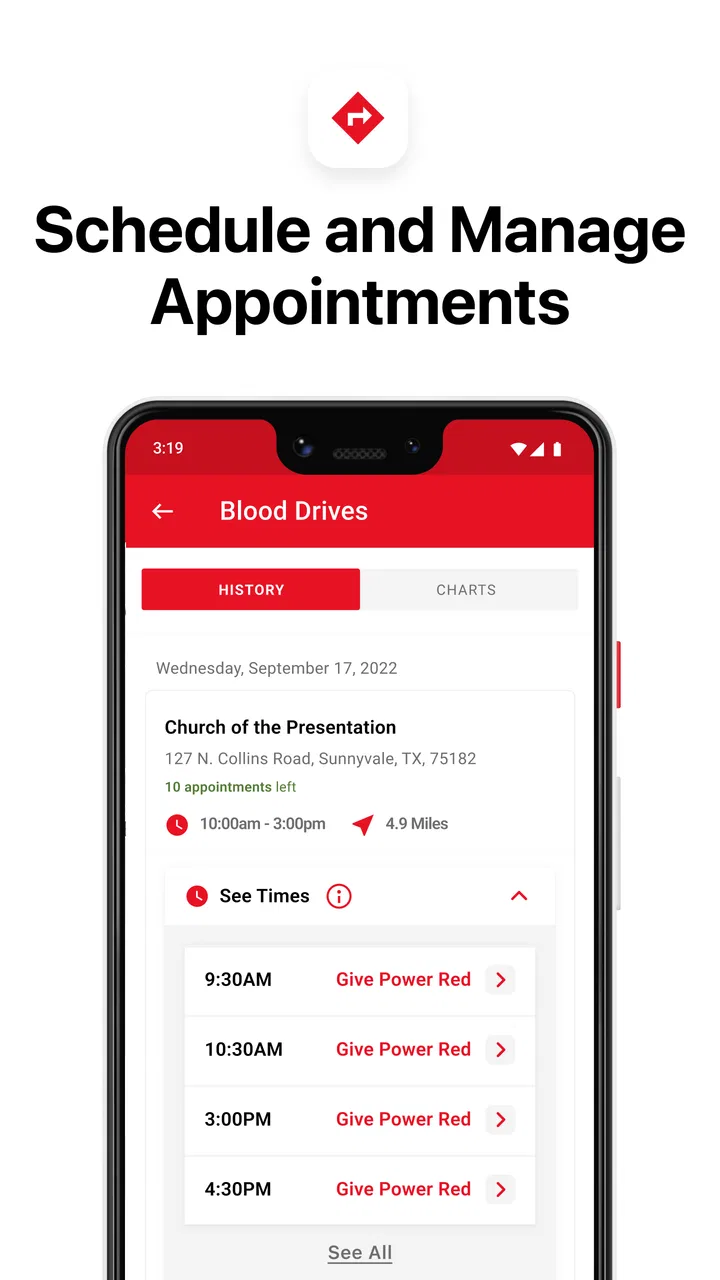
My preferred way to use the app is to open it before I need it, not while I am already rushing to a donation location. I start by checking the available donation information, then look at the appointment-related parts of the experience and make sure the details match my plans. That simple habit turns the app into a planning tool instead of a last-minute search box.
For a first-time donor, the useful sequence is easy to understand: learn what the donation involves, decide whether the timing works, and then use the app to support the appointment process. I would not treat an app screen as a personal medical clearance, though. Eligibility can depend on individual circumstances, so the app is best used alongside the official guidance and instructions provided by the donation organization.
For an experienced donor, the workflow becomes shorter. I can check the next opportunity, review the relevant appointment information, and leave the app. That is an important strength: it does not require me to build a complicated system around it. The best donation tools are the ones that help me act and then get out of the way.
A realistic everyday example would be someone who notices a free Saturday while planning the week. Instead of searching the web, opening several pages, and trying to remember the last donation, that person can use Blood Donor as the starting point for checking the next step. If the schedule works, the appointment becomes part of the calendar rather than an intention that disappears by Friday.
What makes the routine easier for repeat donors
Repeat donations are where the app makes the most sense. I would use it after each visit to establish a consistent habit: check the next suitable opportunity, keep the appointment information together, and review the app again when my schedule changes. The key insight is that the app works better as a recurring checkpoint than as a one-time download.
I also like separating two decisions that people often mix together. The first is whether I want to donate. The second is whether a particular date and location fit my life. Blood Donor helps with the practical side of the second decision, while I still need to pay attention to my health and the official requirements. That distinction prevents me from treating a convenient appointment as proof that I am personally ready to donate.
Another useful habit is checking the app before arranging transport. A donation visit is easier when I have already considered travel time, work or school commitments, and the possibility that the appointment may take longer than a quick errand. The app cannot remove those real-world constraints, but it can give me a central place to begin organizing them.
The app is also a sensible companion for group efforts. If friends or coworkers are encouraging one another to donate, each person can manage their own plans rather than relying on one person to send repeated messages. I would still confirm shared details directly before a group visit, but using individual app workflows keeps personal appointment information separate and reduces confusion.
Settings and phone habits worth checking
Experienced users should spend a few minutes reviewing the app’s available settings and the phone’s notification controls. I do not turn on every alert automatically. I prefer notifications that help me remember an appointment or prompt me to revisit a plan, while avoiding a crowded notification panel that makes important reminders easier to ignore.
The best setup depends on how I normally manage commitments. If my calendar is reliable, I use Blood Donor as the donation-specific reference and my calendar as the broader daily plan. If I often forget health appointments, I give the app’s reminders more attention and check that the phone is not silencing them through a general focus mode or battery-saving rule.
This is a small but non-obvious trade-off: a reminder is only useful if it arrives in a form I will notice. A person who keeps the phone on silent may need a different routine from someone who responds to every notification. I would rather create one deliberate check-in habit than enable every possible prompt and eventually dismiss them all.
I also recommend checking the app after changing phones or adjusting system permissions. Medical and appointment apps can appear fine while their alerts are restricted by the operating system. I do not assume that an update or device migration preserved every preference exactly as I wanted. A quick review before an important donation is more reliable than discovering the problem on the day.
Privacy is another reason to keep the setup intentional. I would provide only the information needed for the app’s donation-related functions and avoid treating it like a general-purpose social platform. The app is useful because it supports a specific activity; I do not need to turn every part of my phone into a donation dashboard.
Faster patterns for people who already know the process
Once the initial setup is complete, I use a repeatable three-step pattern: open the app when I am ready to plan, check the relevant donation or appointment information, and close it once the next action is clear. This sounds obvious, but it prevents a common problem with service apps: spending time browsing without deciding what to do.
Another shortcut is to check the app at natural planning moments rather than randomly. I might look before making my weekly schedule or when I know I will be near a familiar donation location. Tying the check to an existing habit is more dependable than promising myself I will remember later.
For people who donate platelets, the app can be especially useful as part of a more deliberate routine because the commitment may require more careful scheduling than an ordinary errand. I would check the appointment details early, leave enough flexibility around the visit, and avoid making a tight chain of plans afterward. The app helps with organization, but it cannot make a longer appointment fit into an unrealistic timetable.
For a new donor, speed should not be the main goal. I would take time to read the relevant preparation information and understand the process before trying to complete everything quickly. An experienced donor can move through familiar screens faster, but a first visit benefits from patience. The fastest workflow is not necessarily the safest or least stressful one.
A useful repeatable habit is to make the app part of the post-donation routine as well. After leaving the donation site, I would check whether my next planning step is clear and then rely on the app when I am ready to schedule again. This keeps the experience anchored to real actions rather than turning it into an occasional reminder that I may forget between visits.
Where the app should not replace other tools
Blood Donor is not a substitute for emergency care, a doctor’s advice, or direct clarification from donation staff. If I have a health concern, feel unwell, or am unsure whether a personal condition affects eligibility, I would seek the appropriate professional guidance instead of trying to resolve the question through an appointment screen.
It is also not the best choice for someone who wants a broad health tracker. The app is focused on blood and platelet donation, so people looking for medication management, symptom logging, exercise tracking, or general medical records should choose a tool designed for those jobs. Adding unrelated expectations would make the app seem limited when it is actually staying focused.
Compared with searching the web, the app offers a more direct donation-centered workflow. A browser is still better when I need to compare unrelated medical information, read a wide range of sources, or investigate a question outside the American Red Cross donation process. I see Blood Donor as the more convenient repeat-use option, not as a replacement for the entire internet.
Compared with relying on a calendar alone, the app provides more context around the donation activity. A calendar can remind me that I have an appointment, but it does not serve as the same focused starting point for donation planning. On the other hand, a calendar remains better for coordinating the donation with work, travel, childcare, or other commitments. I use both because they solve different problems.
Compared with calling or visiting a donation center without preparation, the app can make the process feel more organized. Still, direct contact may be preferable when a situation is unusual or I need a human answer. The app is strongest for routine planning and weakest when the question requires personal interpretation or immediate clarification.
Advanced limits and the friction I noticed
The biggest limitation is that convenience can create false confidence. Seeing an available path to an appointment does not mean every personal eligibility question has been resolved. I would never skip official instructions because the app makes scheduling feel straightforward. The more familiar I become with the workflow, the more important it is to keep that distinction in mind.
The app also depends on my phone habits. If notifications are blocked, the device is offline at the wrong time, or I rarely open the app, its planning benefits shrink quickly. That is not a flaw unique to this product, but it matters here because the value comes from timely reminders and current appointment information rather than from passive background use.
Another limitation is that the app cannot solve a difficult schedule. If I work changing shifts, travel frequently, or cannot predict my availability, I may still need a calendar, notes, or direct communication with the donation organization. Blood Donor can support the decision, but it cannot negotiate with an employer, arrange transport, or create free time.
I would also avoid assuming that an app update changes the basic nature of the service. The current version is 2.22.0, but software versions can alter layouts and small interactions. My advice is to focus on the task rather than memorizing exact button positions. If an update moves something, the underlying habit—check, confirm, plan—still works.
Device compatibility is worth considering before installation. The app requires operating system version 10 or later, so someone using an older phone may need a different way to manage donation information. That is a practical barrier rather than a reason to dismiss the service, but it means the app is not equally convenient on every device.
Who will get the most from it
I think Blood Donor is a strong fit for regular donors who want one focused place to support their routine. It is also useful for someone preparing for a first donation and looking for an official starting point rather than scattered advice. Families can benefit when several people are planning donations independently, while community organizers may appreciate having a straightforward tool to recommend without asking everyone to build their own process.
The app is less suitable for a person who wants detailed personal health management or who will only use it once. If I am not planning to donate blood or platelets, there is little reason to keep a dedicated donation app installed. Likewise, if I need immediate medical help, I would choose emergency or clinical support instead.
The public response suggests that many people find the app useful: it carries a 4.8 average from around 29 thousand ratings and has passed over 1 million installs. Those figures do not replace my own judgment, but they fit my impression that the app addresses a clear, recurring need rather than trying to be everything at once.
My final view after building a repeatable routine
I like Blood Donor because its usefulness grows with consistency. The first visit helps me understand the workflow, but the real benefit appears when I use it as a quiet planning checkpoint before and after donations. Checking settings, protecting important reminders from phone restrictions, and pairing the app with a normal calendar makes the experience more dependable than simply installing it and hoping I remember.
There is some friction: it cannot answer every personal medical question, it depends on a compatible device and sensible notification settings, and it does not replace direct communication when circumstances are unusual. Those limits are important, but they are also reasonable for a focused donation app. I would rather have a clear tool for planning than a bloated app that makes the basic task harder to find.
My recommendation is straightforward. If you donate blood or platelets through the American Red Cross, I would install it and build one small habit around it: check it when planning the week, confirm the next action, and keep your broader schedule in your usual calendar. For a first-time donor, use it as an organized guide while still following official instructions and asking qualified staff about personal concerns. The best way to use Blood Donor is as a reliable planning companion, not as a replacement for medical judgment.
With a 4.8 average, around 6.5 thousand written reviews, and no purchase cost, it is an easy app to try for the people it is designed to serve. Its age rating is Everyone, which also makes it approachable for a wide range of users. I would not recommend it to someone seeking a general health platform, but for making donation plans easier to remember and manage, Blood Donor earns a place on my phone.
FAQs for Blood Donor
01What features does the Blood Donor app offer?
The Blood Donor app provides several key features, including the ability to schedule blood donation appointments, track your donation history, and receive notifications about local blood drives. Additionally, it offers educational resources about the donation process and eligibility criteria. Users can also connect with other donors and share their experiences.
02Is the Blood Donor app free to use?
Yes, the Blood Donor app is completely free to download and use. There are no hidden fees or in-app purchases required to access its features. This accessibility ensures that anyone interested in donating blood can easily manage appointments and stay informed about donation opportunities.
03How does the Blood Donor app ensure user privacy?
The Blood Donor app prioritizes user privacy by employing encryption techniques to protect personal information. Users can rest assured that their data, including health and contact information, is stored securely. The app complies with all relevant privacy regulations to safeguard user confidentiality at all times.
04Can I use the Blood Donor app to find local donation centers?
Absolutely! The Blood Donor app includes a location-based feature that helps users find nearby donation centers. It provides detailed information about each center, including contact details and operational hours, making it easier to plan your donation around your schedule. This feature is especially useful for new donors.
05Does the Blood Donor app provide reminders for upcoming appointments?
Yes, the Blood Donor app offers a convenient reminder system to ensure you never miss a donation appointment. Users can set up notifications for upcoming donations and receive alerts directly on their smartphones. This feature helps in maintaining a regular donation schedule and contributing consistently to blood banks.
Pros
- User-friendly interface for easy navigation.
- Find nearby donation centers quickly.
- Track your donation history seamlessly.
- Receive alerts for blood donation drives.
- Connect with other donors in your area.
Cons
- Limited support for remote locations.
- Occasional app crashes reported.
- Requires frequent updates for accuracy.
- Notifications can be overwhelming.
- Some features need stable internet.

Blood Donor
Gallery